Can You Pay Gas With USDT in Binance Wallet?
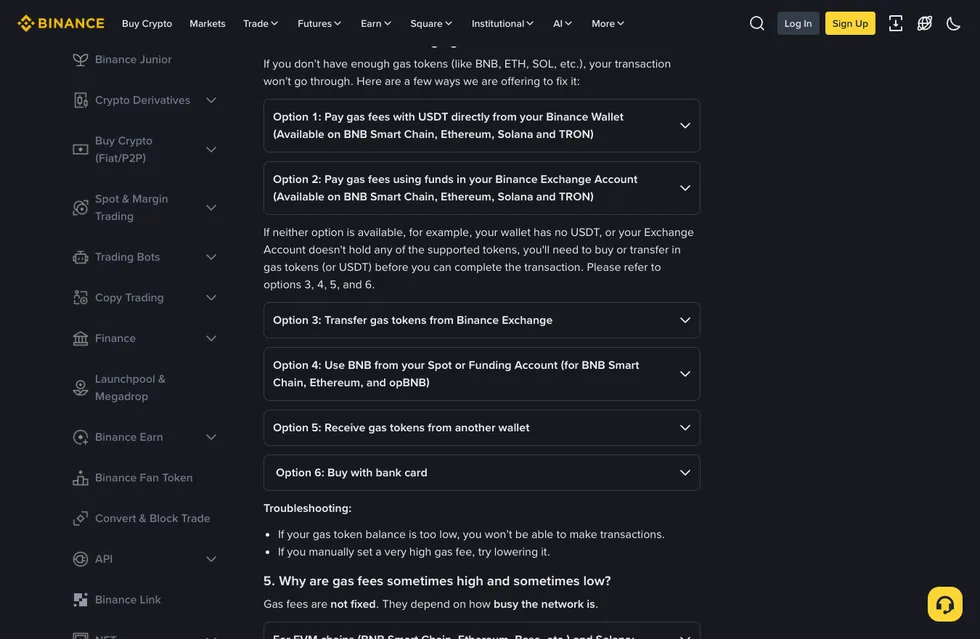
If your Binance Wallet holds USDT and not a single BNB, you can still send transactions on four chains: BNB Smart Chain, Ethereum, Solana and TRON. The gas comes straight out of the USDT in the wallet. This option is listed in the Binance Help Center, in the answer about network fees. The same answer lists a second option: if your Binance exchange account (Spot, Funding or Earn) holds BNB, USDT, USDC, ETH or SOL, it can pay the wallet's gas on those same four chains.
Outside those four, chains such as Base aren't covered by either option, so the wallet still needs that chain's own gas token; on opBNB you can pay with BNB from your exchange Spot or Funding account. Whether a USDT option shows up when you sign, and how much this transaction will cost, both need checking on the confirmation step. Setting up and backing up the wallet itself is covered in the complete Binance Web3 Wallet guide.
Which chains let you pay gas with USDT?
Gas is normally paid in each chain's own token; the help page's examples are BNB on BNB Smart Chain, ETH on Ethereum and TRX on TRON. If you don't hold those, three of the methods on the help page work without topping up the native token in your wallet, and each one covers a different set of chains:
| Chain | USDT in the wallet | Exchange account (BNB, USDT, USDC, ETH, SOL) | BNB in Spot or Funding account |
|---|---|---|---|
| BNB Smart Chain | Yes | Yes | Yes |
| Ethereum | Yes | Yes | Yes |
| Solana | Yes | Yes | — |
| TRON | Yes | Yes | — |
| opBNB | — | — | Yes |
A dash means the chain isn't among the supported chains the help page lists for that method. On BNB Smart Chain and Ethereum all three work; on Solana and TRON only the first two; on opBNB only the last one.
For chains outside the table, such as Base, which the same page mentions when explaining why gas rises and falls, none of the three methods applies. The only route is getting the gas token into your wallet, as described in topping up the gas token when neither option applies.
Paying the wallet's gas from your Binance exchange account
This is the one to use when the wallet has no USDT but your exchange account holds coins. The conditions: your Spot, Funding or Earn account holds at least one of BNB, USDT, USDC, ETH or SOL; when signing, you pick the option to pay gas from your exchange account; and the chain is BNB Smart Chain, Ethereum, Solana or TRON.
The BNB-only method comes with step-by-step instructions on the help page:
- Keep more than 0.01 BNB in your Spot or Funding account, with a little to spare rather than sitting right on the line.
- When signing the transaction, choose which account pays the gas, then select your Binance spot and funding accounts.
- From then on, gas is paid automatically from the Spot or Funding balance.
The two exchange-account methods differ in which coins, accounts and chains they accept. The first takes five coins, Earn balances included, and covers Solana and TRON; the second takes only BNB in Spot and Funding, and adds opBNB.
Checks to make on the signing screen before you confirm
Which coin pays the gas, and which balance it comes out of, is settled at the signing step. Before you tap confirm, go through these points.
You want to send 30 USDT to another address of your own.
- Network: BNB Smart Chain is one of the four chains, so paying gas in USDT is available. The network you pick for the transfer has to match the chain the receiving address is on.
- Where the gas comes from, and how much: if the signing screen shows USDT as the payment, the wallet ends up 30 USDT lighter plus the gas, leaving a little under 20 USDT. For the exact gas amount, read the number on the signing screen.
- Sending the whole balance: send all 50 USDT in one go and there's no USDT left to cover the gas. Send a bit less and leave room for the fee.
- No USDT option on the screen: look for the option to pay from your exchange account instead; if neither is there, use one of the ways to top up gas to get BNB into the wallet.
Switch the same wallet to Base and make the same transfer, and none of the three methods in the table applies; the wallet needs Base's gas token first.
Topping up the gas token when neither option applies
With no USDT in the wallet and none of those five coins in your exchange account, neither USDT-related option works. The help page's guidance is to buy or transfer in the gas token (or USDT) first, then come back and send the transaction. You can top up in these ways:
- Withdraw from the Binance exchange: buy a gas token such as BNB, ETH or SOL on the exchange; in Binance Wallet, open your assets, choose to receive, and pick withdrawing from the Binance exchange; select the right coin and network, and check the address and network once more before you withdraw. Which network to use and how much to send are covered in how to withdraw gas from Binance to your Web3 wallet.
- Transfer from another wallet of yours: if another address holds the gas token, move some of it to the current address, checking the token name, address and network first.
- Buy with a bank card: Visa and Mastercard are supported; check the token name, address and network here as well.
Binance Wallet is a self-custody wallet. The Binance Wallet FAQ answers that if funds are sent to the wrong address, Binance can't refund them. Getting the gas right won't help if a single character of the receiving address is off. After pasting an address, check the first and last few characters; how to do that is covered in what wallet addresses and ENS names are.
Why does a USDT transfer on TRON cost 0.5 TRX one time and 25 TRX the next?
TRON works out network fees differently from other chains. It uses a resource model with two resources, bandwidth and energy, and sending a transaction generally consumes them. When a smart contract is called (the help page's example is simply sending tokens to another address):
- the contract creator may cover part of the energy cost, and if the creator runs short of energy, the caller pays too;
- TRON gives users a set amount of free bandwidth and energy every day, and staking TRX or renting energy gets you more;
- when you have enough resources they cover the fee first; when you don't, TRX of equal value is burned to pay it.
That is the basis for the help page's example: a token transfer sometimes costs only 0.5 TRX, and may cost 25 TRX when resources are short.
On EVM chains such as BNB Smart Chain, Ethereum and Base, and on Solana, it comes down to congestion. The busier the network, the more users bid up gas to get their transactions included, which pushes the price up; when activity drops, gas falls back. Reading units like gwei and the base fee is explained in what a gas fee is, how to read it and how to save on it.
Limits of paying gas with USDT, and what to check yourself before signing
The help page is clear about who gets paid and how the price is set. Network fees go to the blockchain's validators, and none of the fee goes to Binance. The amount is set by the network according to demand and changes all the time, and Binance Wallet works out a suitable fee automatically from current network conditions. If you've set gas very high by hand, the help page suggests lowering it. A transaction that executes but fails still costs gas; that point is in the Binance Wallet FAQ.
Two more things you'll have to check yourself when signing:
- The rate at which USDT is converted into gas, whether there's a markup, and which balance is charged first when both the wallet and the exchange account hold funds. The help page only covers who receives the fee and how it's set, not these points, so read the fee on the confirmation screen before you tap.
- Whether contract interactions such as claiming an airdrop or swapping can be paid in USDT. The help page talks about transactions as a whole and doesn't separate transfers from contract interactions. Whether a given dApp's signing screen offers USDT comes down to the payment options it actually shows.
Frequently asked questions
Do I still pay gas if a Binance Wallet transfer fails?
Yes. Once a transaction has been executed, the gas is charged even if it fails; that is the answer in the Binance Wallet FAQ. Don't keep tapping resend after a failure, because every transaction that executes and fails costs gas again. Before you resend, check that the balance covers the gas, and if you're paying with USDT, check that the chain is one of the four: BNB Smart Chain, Ethereum, Solana or TRON.
Farm these quests next
How to Earn Airdrop Points the Genuine Way
How points are usually calculated, and why sustained small activity beats one big one-off.
Enter quest ▶
What Wallet Addresses and ENS Are
Address structure, checksums, and ENS names — how to check you don't fill in the wrong receiving address.
Enter quest ▶
What Is an Airdrop? How Beginners Play It in 2026
The site's overview: why projects give tokens, points systems, snapshots, realistic expectations.
Enter quest ▶
How to Take Part in Binance Megadrop & Alpha
Low-barrier, beginner-friendly official activities you can get started on with a Web3 wallet.
Enter quest ▶