Is Your Airdrop Farming Paying Off? Keep a Ledger That Shows It

Set up one file with these columns
| Date | Chain | Wallet | What you did | TxID | Gas (native coin) | Spending | Income | Notes |
|---|---|---|---|---|---|---|---|---|
| 09-15 | Ethereum | Main | Small swap on a DEX | 0x… (paste the full hash) | 0.00012 ETH | — | — | Success |
| 09-17 | Ethereum | Main | Called a project's contract | 0x… (paste the full hash) | 0.00006 ETH | — | — | Failed, gas still charged |
Both rows are made-up examples. One row holds one on-chain transaction, or one off-chain expense, such as a month's subscription to a tool. The columns work like this:
- Wallet: a label you will recognise yourself, such as main, test, or the last few characters of the address. Seed phrases and private keys never go in this sheet. Several wallets share the one sheet and this column tells them apart, and opening a second wallet has costs of its own to add up before you do it.
- What you did: the project and the action in one line, clear enough to make sense six months later.
- TxID: the transaction hash, pasted in full. The whole sheet hangs on it, because any other column you skipped can be filled in later from the hash.
- Gas, spending, income: always the amount and the unit first. ETH is written as ETH, and a token goes under its own name.
- Notes: whether it succeeded or failed, and anything you may need to explain later.
To convert into US dollars or your own currency, add the price you used that day and where you got it to the notes. The screenshot in the next section shows why the detail rows stay in the native coin.
The gas column: look up the TxID and copy the Transaction fee
A block explorer shows exactly how much gas each transaction paid. For Ethereum, Blockscout is one you can use: paste the TxID into the search box and open the transaction details page, where Value, Transaction fee, Gas price and Gas usage & limit by txn are listed for that transaction. The only row you copy is Transaction fee.
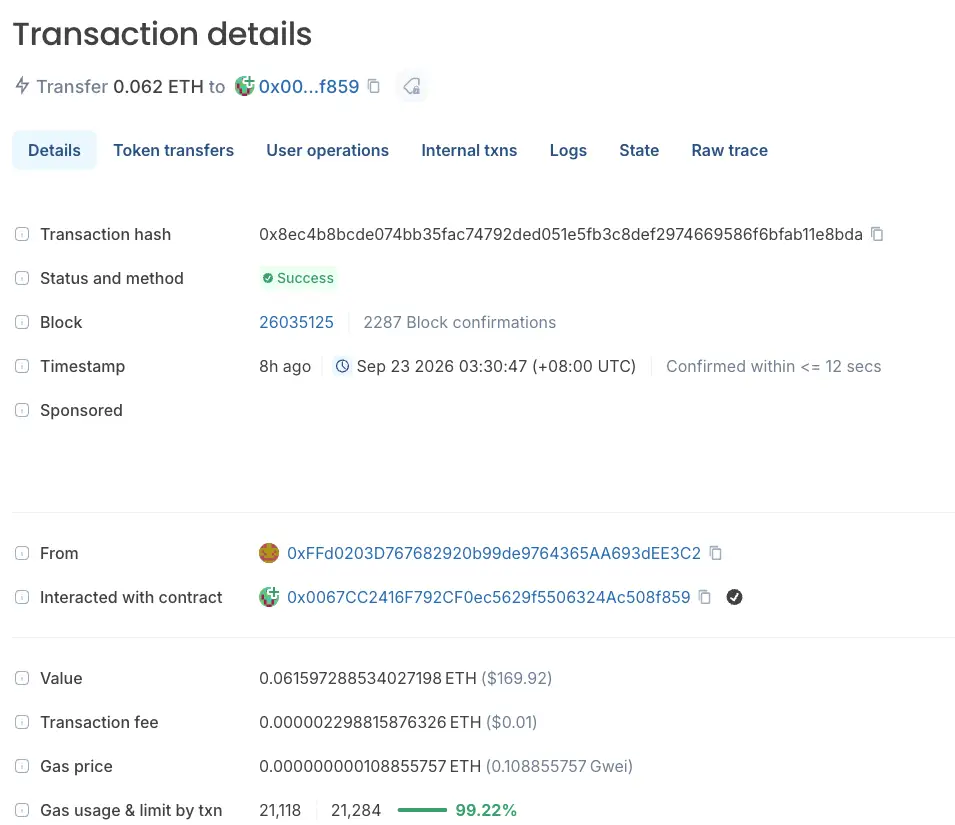
Reading the screenshot row by row:
- Value (about 0.0616 ETH): the amount this transaction sent. The money only moved to another address, so it is no cost and stays out of the gas column.
- Transaction fee (0.000002298815876326 ETH): this is the gas the transaction used up. Copy the whole figure.
- Gas price and Gas usage: where the fee comes from. Here 21,118 times 0.108855757 Gwei gives exactly the figure above. On other chains the fee can have more components, so there is no need to multiply it out yourself, and copying Transaction fee is the least work.
Gas is paid in the chain's native coin, which on Ethereum mainnet is ETH, so this column holds an ETH amount. A failed transaction still uses gas, so one whose status shows as failed gets a row of its own too.
The $0.01 in brackets after the fee is the page's own conversion, and the page does not say which moment's price it uses. Keep the books in the native coin amount, and when you need a conversion, note the price you used that day and its source. For a rough figure before an interaction there is the gas fee calculator; the sheet always holds the actual number the explorer shows afterwards. How the fee itself is worked out is covered in the guide to what a gas fee is and how to read it.
The gas column gets filled one transaction page at a time, each opened from its TxID. With the hash in hand, catching up on gas is only legwork. Without it, you are left going through the address's transaction list entry by entry to work out which project each one belonged to.
Spending: record only money that's gone
One test settles what goes in this column: once the money has left, can you get it back as it was?
- Leave out: capital withdrawn from an exchange to your wallet, and coins moved between your own wallets. The money is still yours; it has only moved.
- Record: the withdrawal fee the exchange deducts, mint fees, sign-up fees for paid tasks, tool subscriptions.
- Record, with a note: coins bought for an interaction and later sold at a loss. The difference you lost goes in.
Whether to log time is up to you. For an hourly figure, add a line in the notes on how long each session took. How to price that time belongs with the wider question of how much airdrop farming can earn.
Income: log the amount on arrival, the money on the day you sell
On the day an airdrop arrives, the income column takes only the token and the amount, for example 150 of some token, and the TxID of the claim goes in as usual. Claiming costs gas too, which goes in the gas column of the same row.
Hold off pricing it on arrival. Until it is sold the price keeps moving, and it may turn out not to be sellable at all. On the day you sell, start a new row: how many you sold, what you actually received after fees, and where you sold. Income then falls into two kinds:
- Cashed out: converted into stablecoins or fiat, so the figure is fixed.
- Not yet cashed out: an amount only, with no price.
A figure moves from the second kind to the first only after you have gone through cashing out the airdrop tokens, fees included.
How often should you update the sheet?
Two moments are enough: paste the TxID on the day of the interaction, and pick one fixed evening a week to fill in gas.
The same-day step is three actions: copy the hash, paste it into the sheet, write one line on what you did. Gas can wait and be copied in a batch; the TxID can't. A few days on, with a dozen transactions in the same wallet, it is hard to tell which one went with which project.
Sunday evening: open the sheet. The 6 rows added this week still have an empty gas column. Open each transaction page from its TxID and copy the Transaction fee: 0.00012, 0.00008, 0.00015, 0.00006, 0.00011 and 0.00009 ETH. The 0.00006 one shows a failed status; copy it anyway.
Total: the six add up to 0.00061 ETH. Converted at an assumed 2,000 US dollars per ETH (an illustrative price, not that week's market), the week's gas comes to about 1.22 US dollars.
Also: a 5-dollar tool subscription was paid this week (again hypothetical). It goes in the spending column, kept apart from gas.
Gas and spending are summed as two separate columns, which is what lets the month-end summary reconcile.
Month end: roll the rows up into one summary table
Sum the detail sheet column by column and enter the totals below. Every figure in the example column is hypothetical and is there only to show the arithmetic.
| Summary line | How it's calculated | Example (hypothetical) |
|---|---|---|
| Gas this month | Sum the gas column chain by chain, in native coin | 0.0024 ETH |
| Gas, converted | Convert each row at the day's price recorded in its notes, then add up | 4.80 US dollars (example at 2,000 US dollars per ETH) |
| Spending this month | Sum of the spending column, leaving out capital that was only moved around | 12.00 US dollars |
| Income cashed out | What you sold this month and actually received after fees | 30.00 US dollars |
| Not yet cashed out | Airdrops not yet sold, as token and amount only | 150 of some token |
| Banked balance this month | Income cashed out − gas, converted − spending this month | 13.20 US dollars |
The balance counts only money that has actually reached you. The not-yet-cashed-out line is kept separate and moves across on the day you sell. If the balance stays negative several months running, put the numbers into the airdrop farming ROI estimator and take another look at where this is heading.
Frequently asked questions
One sheet for several wallets, or one sheet each?
Keep them all in one sheet and use the wallet column to tell them apart. With several sheets, the month-end summary means flipping back and forth, and a transfer between your own wallets can end up as spending in one sheet and income in another. To look at a single wallet, filter by the wallet column.
Can I fill in gas I forgot to record?
Yes. The on-chain record stays there. Open the wallet address in a block explorer, find each past transaction in the list, and copy its Transaction fee the same way. The harder part is the conversion: the price on that past day has to be looked up in historical data, so note where it came from and which day when you fill it in.
What should I keep the ledger in?
An ordinary spreadsheet is enough, local or online, as long as it can sum a column and filter. The only wallet details that go in it are labels and TxIDs. Seed phrases, private keys and wallet passwords never do, least of all in an online spreadsheet.
Which column do bridge fees go in?
Split them in two. Gas paid on the source chain to start the bridge transfer goes in the gas column. If the bridge takes its own fee out of the amount sent, subtract the amount received from the amount sent and record the difference as spending. Paste every TxID you can find on both sides, and say in the notes that they belong to the same bridge transfer.
Farm these quests next

How Much Can You Earn Farming? Real Expectations & Time Cost
Before the books are in order, get a no-hype sense of what farming can return.
Enter quest ▶
What a Gas Fee Is, How to Read It, How to Save
Gas is the column you will fill in most often, so learn how the figure is worked out.
Enter quest ▶
How to Cash Out Airdrop Tokens
When the income column turns into money depends on how this step goes.
Enter quest ▶
Where's the Line with Multiple Wallets?
Every extra wallet adds rows to this sheet, so add up the costs before opening a second.
Enter quest ▶